How to review H1–H6 headings
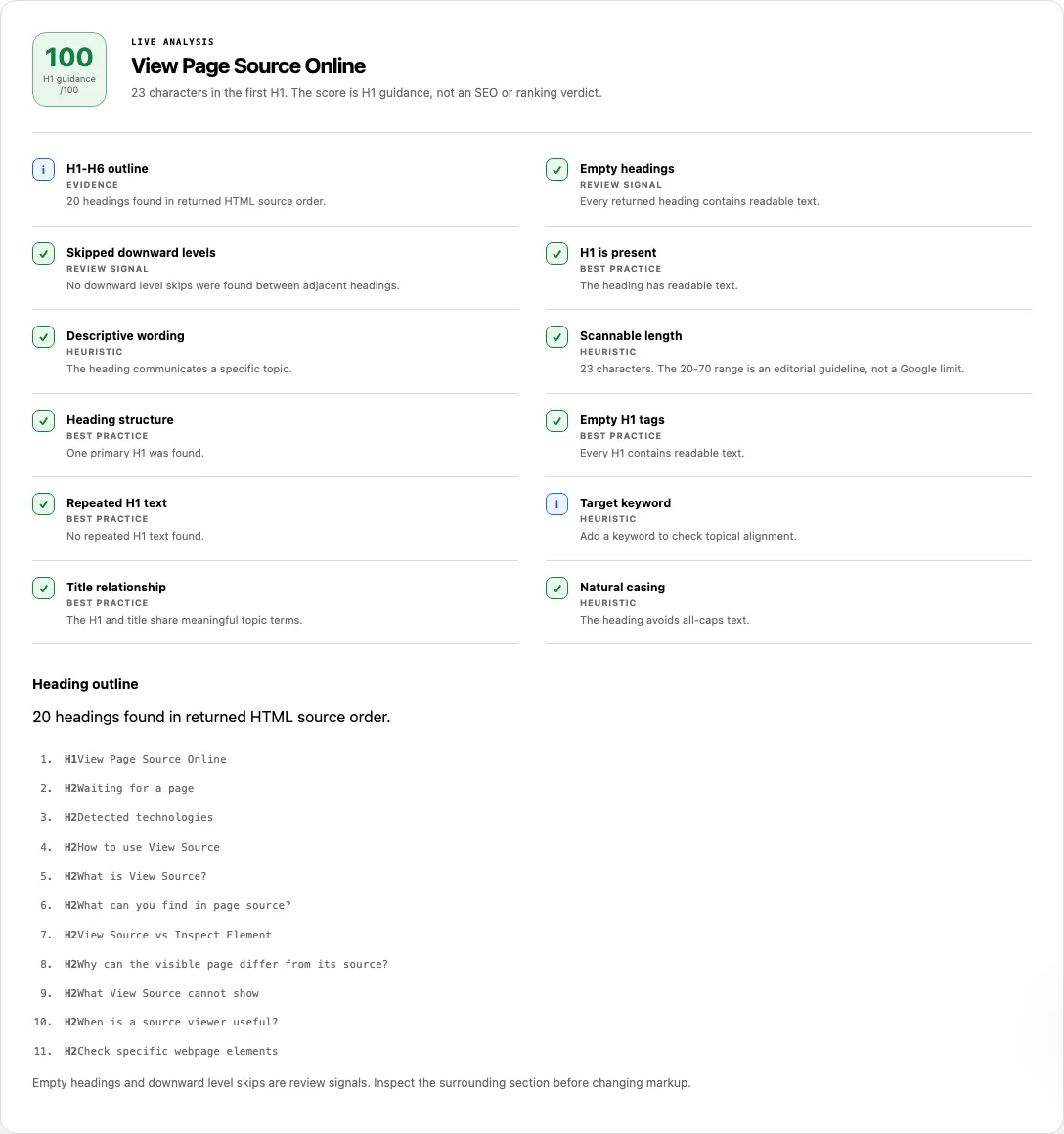
To inspect a page's full heading hierarchy or test a draft H1 headline, choose your input mode and run the analyzer.
- Select From URL to parse a live public webpage's HTML document, or select Paste text to evaluate a single draft H1 string locally.
- Enter the webpage URL (or your H1 text) and optionally provide a Target keyword if you want to check topical term alignment.
- Select Check Headings. In URL mode, inspect the top three outline rows first:
H1-H6 outline,Empty headings, andSkipped downward levels. - Review the 9 H1 wording checks (scored as
H1 guidance /100) and scroll to the Heading outline list at the bottom to read everyH1–H6tag in source order alongside inline level-skip annotations.
Reading your results: URL outline vs. Paste text checks
Heading Checker operates in two distinct modes. From URL mode parses the full HTML document to build a complete H1–H6 outline and compares the primary <h1> against the page's <title>. Paste text mode evaluates only the single H1 string you type without parsing HTML tags.
| Check title | Basis | What it verifies in the analyzer |
|---|---|---|
H1-H6 outline (URL mode only) |
Evidence | Counts every <h1> through <h6> element found in the returned HTML in exact document source order. |
Empty headings (URL mode only) |
Review signal | Warns if any H1–H6 element contains no readable text after whitespace normalization (for example, an icon-only or empty tag). |
Skipped downward levels (URL mode only) |
Review signal | Flags any transition where a heading jumps more than one level deeper than the preceding heading (such as H1 → H3 or H2 → H4). |
H1 is present & Descriptive wording |
Best practice / Heuristic | Verifies that the primary H1 exists and contains at least 2 meaningful non-stopword tokens rather than a generic one-word label. |
Scannable length |
Heuristic | Measures character length against a 20–70 character editorial band. Shorter or longer H1s warn as a readability cue, not a Google limit. |
Heading structure |
Best practice | Passes when exactly 1 H1 tag is present, fails when 0 H1 tags exist, and warns when 2 or more H1 tags exist. |
Empty H1 tags & Repeated H1 text |
Best practice / Heuristic | Fails if any <h1> tag has no text; warns if multiple <h1> tags on the page repeat the exact same string. |
Target keyword & Title relationship |
Heuristic / Best practice | If an optional keyword is entered, checks exact word-boundary token matching. In URL mode, checks whether the H1 and <title> share meaningful topic words. |
Natural casing |
Heuristic | Uses Unicode-aware letter casing detection (hasNaturalCasing) to warn if the entire H1 is written in ALL CAPS, while safely passing scripts without case (like CJK). |
Capability boundary: The H1 guidance /100 score is an editorial clarity heuristic, not a search ranking score. In URL mode, only headings present in the initial server HTML are listed; headings injected by client-side JavaScript are not included.
Worked example: Auditing a source-order heading outline
Suppose a webpage ships the following HTML structure in its server response:
<header>
  <h4>Quick Navigation</h4>
</header>
<main>
  <h1>PostgreSQL Indexing Strategies for High-Write Tables</h1>
  <h2>B-Tree vs. BRIN Indexes</h2>
  <h4>Memory Overhead Comparison</h4>
  <h2><span class="icon-only"></span></h2>
</main>
When you run Heading Checker in From URL mode on this markup, the report pinpoints three structural issues:
- UI chrome before the main H1: The Heading outline lists
H4: Quick Navigationas item #1 because it appears inside<header>before<main>in the DOM source order. Moving fromH4up toH1is an upward transition, so it does not trigger a downward skip, but it shows that layout chrome is using heading tags for font sizing. - Skipped downward level (
H2 → H4): BetweenH2: B-Tree vs. BRIN IndexesandH4: Memory Overhead Comparison, levelH3was skipped.Skipped downward levelswarns, and the outline prints the inline badge:Review: H2 to H4 skips a level. - Empty heading element: The final
<h2>contains only an empty icon span with no text node.Empty headingswarns, and the outline rendersH2 (empty heading)so you can either add accessible text or replace the decorative heading with a<div>.
Multiple H1 tags, skipped levels, and what actually matters for SEO & accessibility
Many legacy SEO tools treat a second <h1> or a skipped <h3> as a fatal ranking penalty. Modern HTML specifications, Google Search documentation, and W3C accessibility guidelines distinguish between search engine parsing and human/screen-reader navigation:
| Heading pattern | Google Search impact | Screen reader & user impact | SolViewer status & recommendation |
|---|---|---|---|
Missing H1 (0 H1 tags) |
Google falls back to <title> or prominent text, but page topic hierarchy is weaker. |
Screen reader users pressing 1 to jump to the main page heading hear no result. |
Failed: Add one clear primary <h1> that summarizes the page's core topic. |
Multiple H1 tags (2+ H1s) |
Valid HTML5; Google has confirmed multiple H1s do not inherently hurt rankings. | Can dilute the primary document landmark if sidebars or modals also use <h1>. |
Warning: Keep one primary <h1> for the main topic and demote secondary section titles to <h2>. |
Downward skip (H2 → H4) |
Minimal direct ranking impact; search engines still read the text. | Confuses assistive technology users who navigate by heading levels (W3C WAI Tutorials). | Warning (Review signal): Change the <h4> to <h3> and use CSS classes for visual font size. |
Empty heading (<h2></h2>) |
Ignored as empty markup noise. | Screen readers announce a blank heading level, creating a broken navigation stop. | Warning / Failed (on H1): Remove empty heading tags or add descriptive text. |
Common problems and fixes
Use these fixes when cleaning up your heading outline:
- Hidden modal, sidebar, or empty-state headings appear in the URL outline.
Cause: URL mode collects everyh1, h2, h3, h4, h5, h6node present in the returned HTML in source order, including dormant UI dialogs or mobile drawers.
Fix: If a UI widget title is not part of the document outline (such as a cookie banner or empty-state placeholder), use a<p>,<div>, or<strong>styled with CSS instead of an<h2>or<h3>. - Paste text mode did not output an H1–H6 outline.
Cause: Paste text mode is designed to evaluate a single H1 headline string (length, wording, casing, and keyword overlap); it does not run an HTML parser.
Fix: Switch to From URL mode to parse a live page's H1–H6 hierarchy, or use SEO Checker / View Source to inspect pasted HTML markup. Skipped downward levelswarns because developers picked heading tags for font size.
Cause: Using<h4>under<h2>because the default stylesheet made<h3>look too large.
Fix: Decouple semantic HTML levels from visual typography:<h2 class="section-title">Pricing Plans</h2> <h3 class="card-subtitle-sm">Starter Tier</h3>Title relationshipwarns that the H1 and title do not share clear topic terms.
Cause: The<title>tag targets your primary topic while the<h1>uses vague marketing copy (such as "Welcome to the Future") with zero shared meaningful words.
Fix: Align your<h1>with your<title>so visitors clicking from search results immediately see the topic they searched for, following Google's title link best practices.
How this check works
In From URL mode, Heading Checker fetches the server-returned HTML, parses it with DOMParser, and queries h1,h2,h3,h4,h5,h6 in document order. The analyzeHeadingOutline function normalizes whitespace, counts tags per level (1–6), flags empty nodes, and records downward transitions where current.level > previous.level + 1.
Word segmentation uses Intl.Segmenter (with a Unicode property regex fallback) so non-English scripts and hyphenated terms are tokenized accurately without false substring matches (for example, searching for seo will not falsely match Seoul). All URL requests follow the SolViewer public retrieval limits.
Frequently asked questions
Can a webpage have more than one H1 tag without hurting SEO?
Yes. Multiple <h1> tags are valid HTML, and Google's systems can process pages with more than one H1. However, SolViewer flags multiple H1s with a Warning because using a single primary <h1> makes the page's main topic clearer for both readers and screen-reader navigation.
Why does moving from H4 back to H2 not trigger a skipped-level warning?
Closing a deeply nested subsection (H4) and starting a new top-level section (H2) is normal hierarchical structure. Only downward skips—such as jumping from an H2 directly into an H4 without an intermediate H3—represent a missing level in the outline.
Does the 20–70 character H1 length check reflect a Google limit?
No. Google does not enforce a character limit on <h1> elements. The 20–70 character band is an editorial heuristic designed to flag one-word generic headings on the low end and multi-sentence paragraphs wrapped in an <h1> on the high end.
What is the difference between From URL mode and Paste text mode?
From URL mode fetches a live webpage, extracts every H1–H6 tag in source order, checks for empty headings and level skips, and compares the first H1 against the page's <title>. Paste text mode evaluates a single plain-text H1 draft as you type and does not parse HTML tags.
Why is a heading I see on my live website missing from the Heading outline?
If your page renders headings on the client using JavaScript after the initial HTML loads, those elements are not present in the server-returned HTML. Use View Source to inspect the raw response and move important content headings to server-rendered HTML.
Related tools
- SEO Checker — audit your headings alongside title tags, meta descriptions, canonicals, landmarks, and structured data.
- View Source — inspect the exact line numbers and parent containers of surprising or hidden headings in your raw HTML.
- Meta Description Checker — review your page summary's pixel width and snippet directives.
- SERP Snippet Preview — preview how your
<title>and description render in desktop and mobile search results.
Public URL requests follow the shared fetch limits on the About page.