How to test robots.txt for a URL
To check whether a URL is allowed or blocked by robots.txt, test the live origin URL against a specific crawler token or paste a draft file for syntax analysis.
- Select From URL to test a live website, or switch to Paste content to validate raw
robots.txtlines locally in your browser. - In From URL mode, enter the full page URL you want to test (for example,
https://example.com/news/article?ref=home) and select a Crawler from the dropdown:Googlebot,Googlebot News,Googlebot Image,Googlebot Video,Google Inspection Tool,Bingbot,YandexBot, orAny crawler (fallback). - Select Check Robots.txt. In URL mode, SolViewer automatically fetches
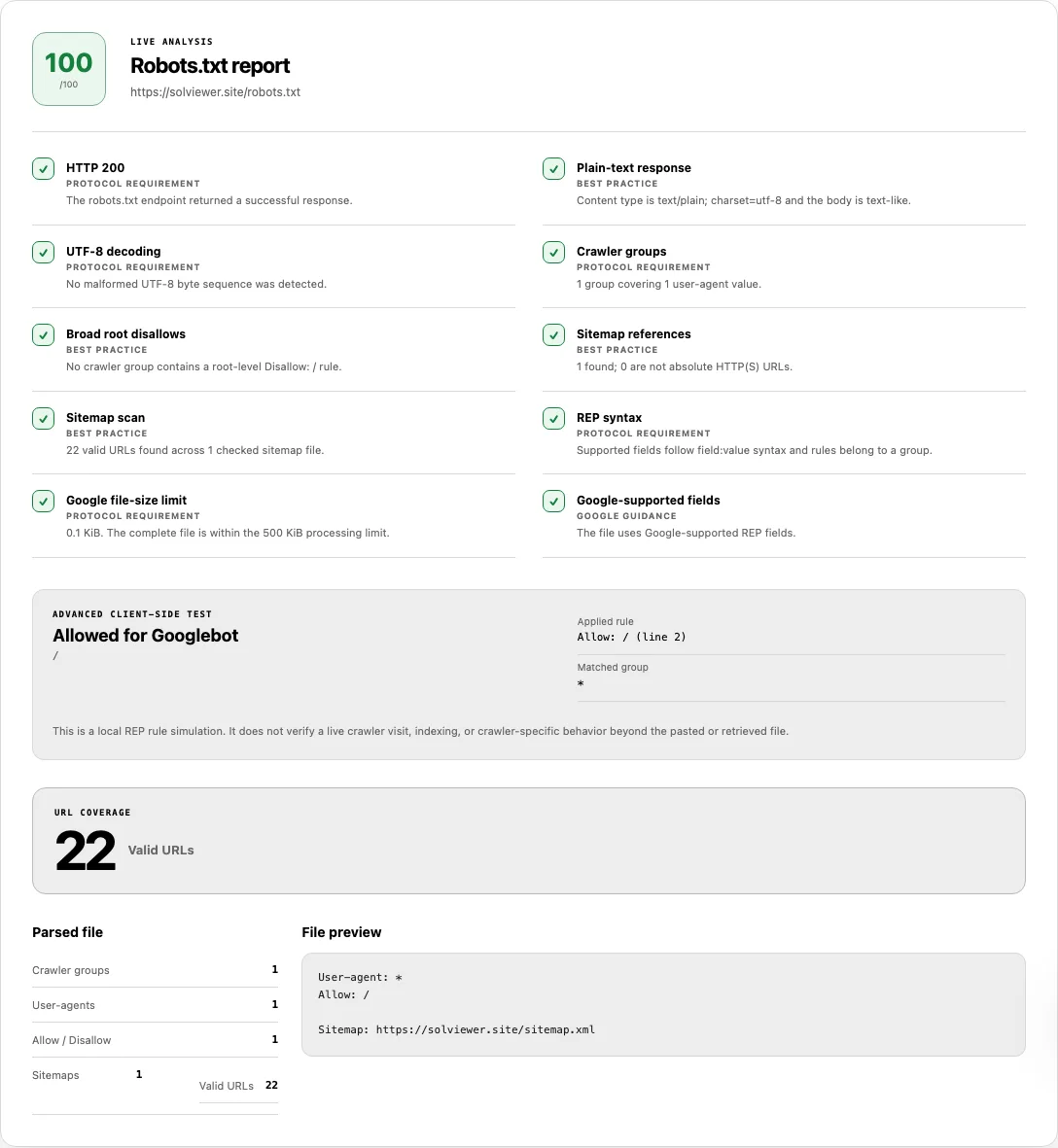
/robots.txtfrom the origin root, scans declared sitemaps, and runs the path simulation against the URL you entered. - Review the Robots.txt report checks first, then inspect the ADVANCED CLIENT-SIDE TEST card to see the exact
Applied rule(including line number) andMatched group.
Reading your results
Robots.txt Checker combines HTTP delivery checks, RFC 9309 syntax validation, bounded sitemap scanning, and a client-side path simulator. Each row in the report evaluates a distinct requirement:
| Report check / Section | Basis | How to interpret Pass, Warning,Failed, or Info |
|---|---|---|
HTTP 200 (or status code) |
Protocol requirement | In URL mode, HTTP 2xx passes. A 4xx status (except 429) is reported as Info because Google treats a missing robots.txt as unrestricted crawling. HTTP 429 or 5xx fails (score 0) because server errors can cause Google to pause crawling. |
Plain-text response / Plain-text content |
Best practice | Passes when the file is plain text (text/plain). Fails if the body contains <html>, <body>, or <!doctype> markup—common when an origin serves an HTML 404 page at /robots.txt. |
UTF-8 decoding |
Protocol requirement | Passes when no malformed UTF-8 byte sequences are present. Warns if replacement characters were needed during decoding. |
Crawler groups |
Protocol requirement | Counts valid User-agent blocks and total user-agent tokens. Fails if no User-agent declaration exists. |
Broad root disallows |
Best practice | Warns when any group contains Disallow: /, listing the affected user-agents while noting that more-specific Allow rules can still permit individual paths. |
Sitemap references & Sitemap scan |
Best practice | In URL mode, validates that declared Sitemap: lines are absolute HTTP(S) URLs, then fetches up to 12 sitemaps (and up to 12 child sitemaps per index) to count valid URLs in the URL COVERAGE panel. |
REP syntax |
Protocol requirement | Flags lines that lack field: value formatting, orphan Allow/Disallow rules placed before any User-agent, or non-empty path values that do not start with /. |
Google file-size limit |
Protocol requirement | Measures UTF-8 byte size against Google's 500 KiB (512,000 bytes) cutoff. If a file exceeds 500 KiB, SolViewer truncates analysis at 500 KiB to match Googlebot's parser. |
Google-supported fields |
Google guidance | Reports Info when recognized extension directives such as Crawl-delay, Host, Clean-param, Request-rate, or Visit-time appear, since Googlebot ignores them. |
In From URL mode, the ADVANCED CLIENT-SIDE TEST card prints the verdict (such as Allowed for Googlebot or Disallowed for Bingbot), the tested path+query, the winning Applied rule with its exact line number (for example, Allow: /news/public (line 4) or No matching rule), and the Matched group. In Paste content mode, the tool validates file syntax and groups without running the URL path test. This simulation evaluates REP rules locally and does not confirm a live Googlebot crawl or index status.
Worked example: How RFC 9309 longest-match & group specificity work
A common mistake when editing robots.txt is assuming that rules are read top-to-bottom until the first match, or that a wildcard User-agent: * group combines with a specific User-agent: googlebot group. Consider this robots.txt file when testing https://example.com/catalog/shoes?sort=price for Googlebot:
# Group 1: Global fallback
User-agent: *
Disallow: /catalog/

# Group 2: Googlebot-specific rules
User-agent: Googlebot
Disallow: /catalog/
Allow: /catalog/shoes
Disallow: /*?sort=
Here is the exact 3-step algorithm SolViewer's testRobotsAccess engine runs to determine the verdict:
- Step 1 — User-agent group specificity: The parser normalizes the selected crawler token (
googlebot) and compares it against all declared groups. Because an explicitUser-agent: Googlebotgroup exists (specificity length9), Group 2 wins exclusively. Group 1 (User-agent: *, specificity0) is completely ignored for Googlebot. - Step 2 — Pattern matching & specificity calculation: Against the target path
/catalog/shoes?sort=price, all three rules in Group 2 match:Disallow: /catalog/matches (path specificity:9non-wildcard characters).Allow: /catalog/shoesmatches (path specificity:14non-wildcard characters).Disallow: /*?sort=matches because*spanscatalog/shoes(path specificity after stripping*:7characters).
- Step 3 — Longest match & tie-breaker: Under RFC 9309, the rule with the highest character specificity wins. Here,
Allow: /catalog/shoes(length14) beats bothDisallow: /catalog/(9) andDisallow: /*?sort=(7). If anAllowand aDisallowrule ever tie at the exact same specificity length, Allow wins the tie. The report outputsAllowed for GooglebotwithApplied rule: Allow: /catalog/shoes (line 8).
Why Google may still index a URL that robots.txt disallows
One of the most frequent surprises in Google Search Console is seeing a page flagged as "Indexed, though blocked by robots.txt"—or seeing a URL appear in search results after you added Disallow: /private-page/. This happens because robots.txt controls crawling, not indexing.
| Control mechanism | Where it lives | Can Googlebot fetch the URL? | Can the URL appear in Google Search results? |
|---|---|---|---|
Disallow: /path/ |
Origin /robots.txt file |
No. Compliant crawlers will not request the URL. | Yes (as a title-less URL listing) if external or internal pages link to it, because Google never opens the page to see if it should be excluded. |
<meta name="robots" content="noindex"> |
HTML <head> of the page |
Yes (unless blocked by robots.txt). |
No. Once Googlebot crawls the page and reads the noindex tag, it drops the URL from search results. |
X-Robots-Tag: noindex |
HTTP response headers | Yes (unless blocked by robots.txt). |
No. Works for HTML pages as well as PDFs, images, and non-HTML files once crawled. |
Disallow + noindex together |
Both /robots.txt and the page |
No. robots.txt stops the crawl first. |
Trap: Because Googlebot is blocked from fetching the URL, it can never read your noindex tag, so the URL can remain indexed indefinitely. |
As stated in Google's Introduction to robots.txt, if you need to remove a page from search results, allow crawling in robots.txt and apply a noindex meta tag or X-Robots-Tag header on the response.
Common problems and fixes
Use these fixes when resolving warnings or failures in your robots.txt report:
Plain-text responsefails because the file contains HTML.
Cause: Your CMS or single-page router intercepted/robots.txtand returned an HTML homepage or styled 404 template with anHTTP 200status.
Fix: Configure your web server or CDN to serve a statictext/plain; charset=utf-8file at/robots.txt, or return a cleanHTTP 404if you want unrestricted crawling:User-agent: * Disallow: Sitemap: https://example.com/sitemap.xmlREP syntaxwarns about invalid or misplaced lines.
Cause: Rules were placed at the top of the file before anyUser-agent:line (orphan rules), or a non-emptyAllow/Disallowpath omitted its leading slash (for example,Disallow: admin/instead ofDisallow: /admin/).
Fix: Ensure every group begins with at least oneUser-agent:line and every non-empty path starts with/or*.Google-supported fieldsreports an informational note onCrawl-delay.
Cause: The file includesCrawl-delay: 10,Host:, orClean-param:.
Fix: LeaveCrawl-delayif you need it for Bingbot or YandexBot, but do not rely on it to throttle Googlebot—Google ignores those extension fields completely.- A query-string URL is still crawled despite
Disallow: /search.
Cause: If the rule uses an end anchor (Disallow: /search$), it only blocks the exact path/searchand allows/search?q=shoes.
Fix: Remove the trailing$or add an explicit wildcard rule (Disallow: /search*orDisallow: /*?q=) and verify the query URL in the URL to test box above. HTTP 500orHTTP 503fails the report with a score of0.
Cause: Your origin returned a 5xx server error orHTTP 429when SolViewer requested/robots.txt.
Fix: Resolve the origin error urgently. Unlike a 404 (which permits normal crawling), persistent 5xx responses on/robots.txtcause Googlebot to halt crawling across the entire hostname to avoid assuming permissions.Google file-size limitfails above 500 KiB.
Cause: Thousands of individual product or spam URLs were appended torobots.txt, pushing the file past 512,000 UTF-8 bytes.
Fix: Replace long lists of individual URLs with prefix directories or wildcard patterns (*), and move page-level exclusions tonoindextags. Rules located after byte 512,000 are ignored by Google and by this tester.
How this check works
Google Search Central retired the legacy Search Console robots.txt tester on 15 November 2023 (announcement). SolViewer provides an immediate browser-based workflow to test both live origin files and draft rules before deployment.
When you submit a URL, the checker normalizes the origin to /robots.txt, strips any leading UTF-8 BOM (\uFEFF), truncates parsing at 500 * 1024 bytes, and groups consecutive User-agent lines in accordance with RFC 9309 (Robots Exclusion Protocol) and Google's robots.txt specification. Non-ASCII rule paths are compared in both raw and percent-encoded (encodeURI) forms. If the file declares valid HTTP(S) Sitemap: lines, SolViewer performs a bounded scan of up to 12 sitemaps (and up to 12 child sitemaps per index) to verify XML delivery and total URL coverage.
All origin fetches follow the SolViewer public retrieval limits.
Frequently asked questions
Why does the URL path test disappear when I switch to Paste content mode?
In From URL mode, you provide a target URL and crawler so the tool can fetch the origin's /robots.txt and simulate whether that exact path is allowed. Paste content mode is designed for instant live-as-you-type syntax, group, and byte-limit validation of raw robots.txt text without a target URL.
What happens if two rules match my URL with the exact same path length?
Under RFC 9309 and Google's specification, the most specific rule (measured by non-wildcard character length) wins. If an Allow rule and a Disallow rule have the exact same specificity length, the Allow rule wins the tie.
Does a missing robots.txt file (HTTP 404) hurt my SEO?
No. Publishing a robots.txt file is optional. When a server returns a standard 404 or 410 for /robots.txt, search engines treat the site as having no crawl restrictions. That is why SolViewer scores a 404 as an informational state rather than a failure.
Why did Googlebot ignore my User-agent: * rules?
If your robots.txt file includes a dedicated User-agent: Googlebot group anywhere in the file, Googlebot follows only that specific group and completely ignores the fallback User-agent: * group. Repeat any global disallow rules inside the Googlebot group if you want Googlebot to obey them.
Does Sitemap scan crawl every webpage listed inside my sitemap?
No. When Sitemap: URLs are present in robots.txt, SolViewer fetches up to 12 sitemap XML files (and up to 12 child sitemaps for a sitemap index) to verify that the XML parses and to count the valid <loc> entries. It does not crawl the individual HTML webpages listed inside those sitemaps.
Related tools
- XML Sitemap Checker — run a full structural, namespace, and W3C
lastmodvalidation on any sitemap URL declared in yourrobots.txt. - SEO Checker — inspect a specific webpage for
noindexmeta tags,X-Robots-Tagheaders, and canonical consolidation signals. - HTTP Header Checker — verify HTTP status codes, redirect chains, and
X-Robots-Tagheaders when a URL is blocked or redirecting unexpectedly. - View Source — inspect the raw HTML document that crawlers receive when
robots.txtpermits access.
Public URL requests follow the shared fetch limits on the About page.