How to inspect HTTP response headers
To inspect HTTP response headers, redirect hops, and cookie flags for a webpage, submit its public URL and review the categorized report.
- Enter the full public webpage URL (including
http://orhttps://) into the URL field. - Select Check Headers to follow redirects (up to 5 hops) and capture the headers returned on the final response.
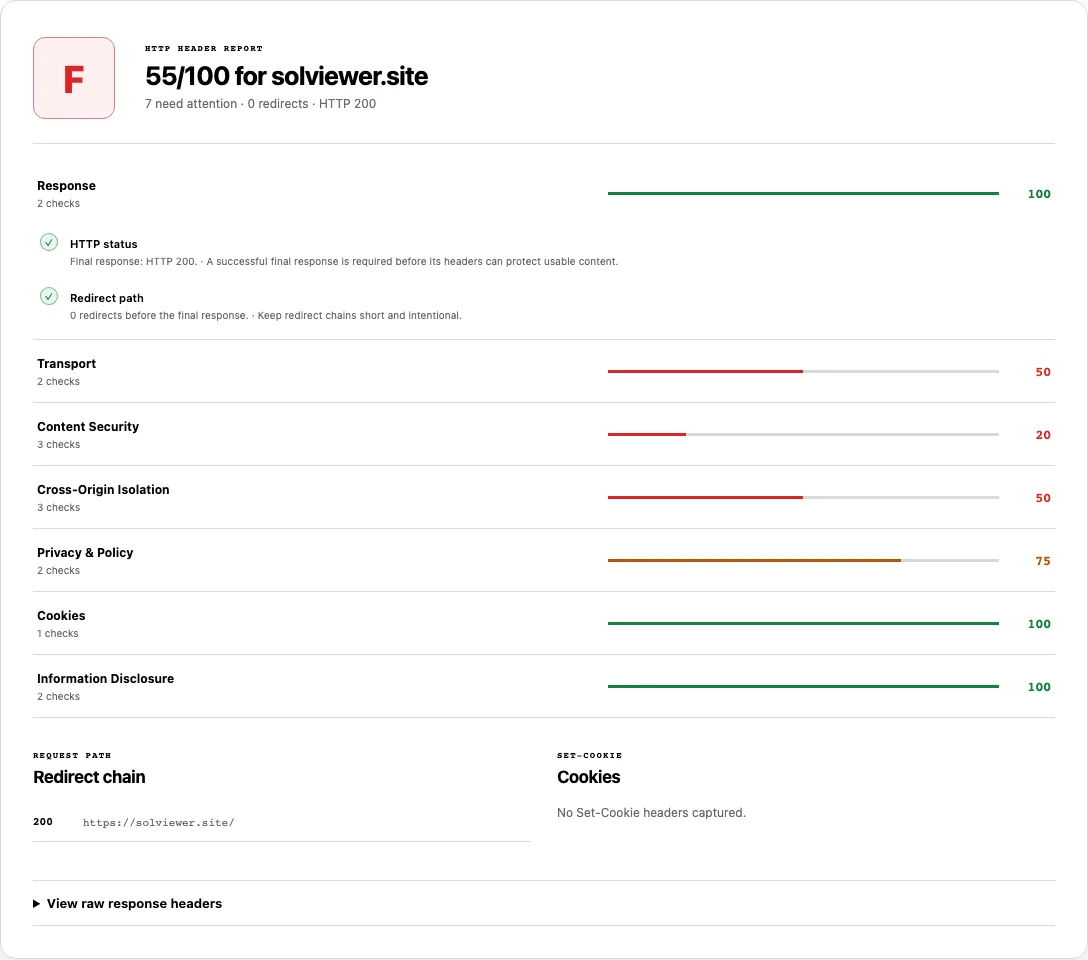
- Review the HTTP HEADER REPORT banner at the top: it shows the weighted presence score (
0–100and letter gradeA–F) for the hostname, how many checks need attention, the redirect count, and the final HTTP status code. - Expand the seven audit categories, check the Redirect chain and Cookies panels, and open View raw response headers to inspect every unparsed header key and value (including
X-Robots-Tag,Cache-Control, andVary).
Reading your results: All 7 header categories and thresholds
HTTP Header Checker evaluates 15 distinct response checks grouped into seven categories. The summary score is a weighted presence check of these headers—not a full application security audit.
| Category | Checks included | Pass / Warn / Fail / Info rules in the analyzer |
|---|---|---|
| 1. Response | HTTP status, Redirect path |
HTTP status passes on 2xx, warns on 3xx, and fails on 4xx/5xx. Redirect path passes on 0–1 hops, warns on 2–3 hops, and fails on 4 or more hops. |
| 2. Transport | HTTPS, HSTS |
HTTPS requires an https: final URL. HSTS passes when Strict-Transport-Security declares max-age >= 31536000 (1 year), warns if max-age is lower, and fails if the header is missing. |
| 3. Content Security | Content-Security-Policy, Clickjacking protection, X-Content-Type-Options |
CSP passes when present without unsafe-eval, warns if unsafe-eval is present, and fails if missing. Clickjacking protection requires X-Frame-Options or CSP frame-ancestors. X-Content-Type-Options requires nosniff. |
| 4. Cross-Origin Isolation | Cross-Origin-Opener-Policy, Cross-Origin-Embedder-Policy, Cross-Origin-Resource-Policy |
Each header passes when declared on the response and warns when missing. |
| 5. Privacy & Policy | Referrer-Policy, Permissions-Policy |
Passes when the respective policy header is returned; warns when missing. |
| 6. Cookies | Cookie flags (plus the SET-COOKIE visual list) |
Reports Info if no Set-Cookie headers are sent. If cookies are present, passes when every cookie sets Secure, HttpOnly, and SameSite, and warns if any cookie omits one of those flags. |
| 7. Information Disclosure | Server header, X-Powered-By |
Server header warns if a numeric version string (like nginx/1.24.0) is exposed, passes if generic (cloudflare), and is Info if absent. X-Powered-By warns when present and is Info when absent. |
Capability boundary: Missing security headers are configuration observations, not proof that a website is vulnerable, and present headers do not guarantee complete protection against XSS, CSRF, or authentication flaws.
Worked example: Tracing redirects, security headers, and X-Robots-Tag
Suppose you enter http://example.com/blog (using plain HTTP and no trailing slash) into HTTP Header Checker. The server redirects twice before returning the final response:
# Redirect chain captured by SolViewer:
301 -> http://example.com/blog
301 -> https://example.com/blog
200 -> https://example.com/blog/

# Final response headers on https://example.com/blog/:
strict-transport-security: max-age=31536000; includeSubDomains
content-security-policy: default-src 'self'; frame-ancestors 'none'
x-content-type-options: nosniff
referrer-policy: strict-origin-when-cross-origin
server: cloudflare
x-robots-tag: noarchive
Here is how to read this output in the report:
- Response & Redirect chain: The REQUEST PATH → Redirect chain panel lists all three rows (two
301hops followed by the final200URL). Because there are 2 redirects before the final page,Redirect pathshows a Warning (2 redirects before the final response), prompting you to update internal links to point directly tohttps://example.com/blog/. - Content Security & Transport: Even without a standalone
X-Frame-Optionsheader,Clickjacking protectionpasses withCSP frame-ancestorsbecause the analyzer recognizesframe-ancestors 'none'insideContent-Security-Policy. - Raw response headers (SEO evidence): Opening View raw response headers reveals
x-robots-tag: noarchive, which would never appear if you only inspected HTML tags in a browser.
Why redirect chains and X-Robots-Tag headers matter for technical SEO
Most header tools focus exclusively on security grading (like SecurityHeaders) or exclusively on status codes. Combining redirect tracing, security headers, and raw header inspection solves three hidden SEO problems at once:
- Eliminating multi-hop redirect chains: When HTTP-to-HTTPS, non-www-to-www, and trailing-slash redirects execute sequentially (
http://example.com/page→https://example.com/page→https://www.example.com/page→https://www.example.com/page/), every hop adds network latency and risks hitting crawler redirect limits. Consolidating rules at the edge so any variant resolves in 1 hop keepsRedirect pathin thePassband. - Uncovering invisible
X-Robots-Tagblocks: Staging environments and CDN workers often attachX-Robots-Tag: noindex, nofollowin HTTP headers. BecauseX-Robots-Tagdoes not appear in HTML source code, site owners frequently miss it after launching to production. Checking View raw response headers (or running SEO Checker) exposes header-levelnoindexdirectives immediately. See Google's X-Robots-Tag documentation. - Verifying final-destination headers: Intermediate
301or302responses often lack HSTS or CSP headers. SolViewer follows the redirect chain first and scores the headers on the final destination response that browsers and search crawlers actually render.
Common problems and fixes
Use these server configuration fixes when addressing warnings or failures in your header audit:
HSTSfails or warns thatmax-ageis below 31536000.
Cause: TheStrict-Transport-Securityheader is missing or uses a short test value such asmax-age=3600.
Fix: Once your entire domain and subdomains serve valid HTTPS certificates, set a one-year minimummax-age:Strict-Transport-Security: max-age=31536000; includeSubDomainsClickjacking protectionfails.
Cause: NeitherX-Frame-Optionsnor a CSPframe-ancestorsdirective is present on the final response.
Fix: Addframe-ancestors 'self'(or'none') to yourContent-Security-Policyheader, or addX-Frame-Options: SAMEORIGIN.Cookie flagswarns that cookies missSecure,HttpOnly, orSameSite.
Cause: A session or analytics cookie inSet-Cookieomitted one of the three defensive attributes.
Fix: Append the flags when issuing cookies from your backend:Set-Cookie: session_id=xyz; Path=/; Secure; HttpOnly; SameSite=LaxServer headerorX-Powered-Bywarns about version disclosure.
Cause: Default server configurations broadcast exact software versions (such asServer: Apache/2.4.58orX-Powered-By: Express).
Fix: Disable version tokens (for example,server_tokens off;in Nginx orapp.disable('x-powered-by')in Express) so automated scanners cannot fingerprint patch levels from headers alone.Cross-Origin Isolationheaders warn on a standard marketing page.
Cause:Cross-Origin-Opener-Policy(COOP),Cross-Origin-Embedder-Policy(COEP), andCross-Origin-Resource-Policy(CORP) are not set.
Fix: Note that strict COEP (require-corp) can break third-party embeds, ads, or cross-origin images that do not send CORP/CORS headers. Test in staging before enabling full cross-origin isolation.
How this check works
When you submit a URL, SolViewer's fetch service requests the public address, records each intermediate redirect status and URL (up to 5 hops), and captures the HTTP status code, normalized response headers, and raw Set-Cookie headers from the final destination response.
In your browser, header-analyzer.js and buildHeaderAudit evaluate status and redirect counts, parse Strict-Transport-Security max-age integers via parseHstsMaxAge, inspect Content-Security-Policy for unsafe-eval and frame-ancestors, and parse each Set-Cookie string for Secure, HttpOnly, and SameSite attributes. Header definitions follow the MDN HTTP Headers reference and MDN HTTP Redirections guide.
All requests follow the SolViewer public retrieval limits.
Frequently asked questions
How many redirects are acceptable before a warning appears?
SolViewer grades 0 or 1 redirect hop as Passed, 2 or 3 hops as Warning, and 4 or more hops as Failed (up to the 5-redirect fetch limit). A single permanent redirect (such as http:// to https://) is normal when visiting an unencrypted link, but internal links on your site should always point directly to the final 200 URL with 0 redirects.
Does HTTP Header Checker evaluate headers on the redirect or the final URL?
The 7 header categories and the 0–100 score evaluate the final response after following redirects, while the Redirect chain panel lists every intermediate hop and its status code.
Where can I see X-Robots-Tag, Cache-Control, or custom CDN headers?
Scroll to the bottom of the report and expand View raw response headers. That drawer lists every HTTP response header returned by the origin server in alphabetical key-value pairs.
Why does Content-Security-Policy show a warning when a CSP header is present?
If your Content-Security-Policy header includes the unsafe-eval directive, the checker downgrades the item from Passed to Warning because unsafe-eval permits dynamic code execution from strings.
Does a high score in HTTP Header Checker mean my website is completely secure?
No. Response headers are one layer of browser defense-in-depth. A 100/100 score indicates that the recommended transport, framing, MIME, cross-origin, privacy, and cookie headers are present on that URL, not that the underlying application is free of vulnerabilities.
Related tools
- SEO Checker — combine
X-Robots-Tagand security header checks with title, canonical, hreflang, and structured data analysis. - View Source — inspect the raw HTML body returned alongside these HTTP headers.
- Robots.txt Checker — test origin
/robots.txtcrawl rules, which govern URL fetching rather than header-levelX-Robots-Tagindexing. - XML Sitemap Checker — verify that URLs in your XML sitemap point directly to final 200 destinations instead of redirecting paths.
Public URL requests follow the shared fetch limits on the About page.