How to check a meta description tag
To audit the meta[name="description"] tag of a deployed page or test a draft summary before publishing, choose your input mode and run the checker.
- Select From URL to fetch a public webpage's HTML and HTTP headers, or select Paste text to evaluate a draft description live as you type.
- Enter the webpage URL (or paste your description copy) and optionally enter a Target keyword to check natural term inclusion.
- Select Check Description to run the 10 diagnostic checks and calculate the editorial guidance score (
0–100). - Review
Description is present,Description tag count,Desktop preview width,Mobile preview width, andSnippet directivesbefore editing your copy.
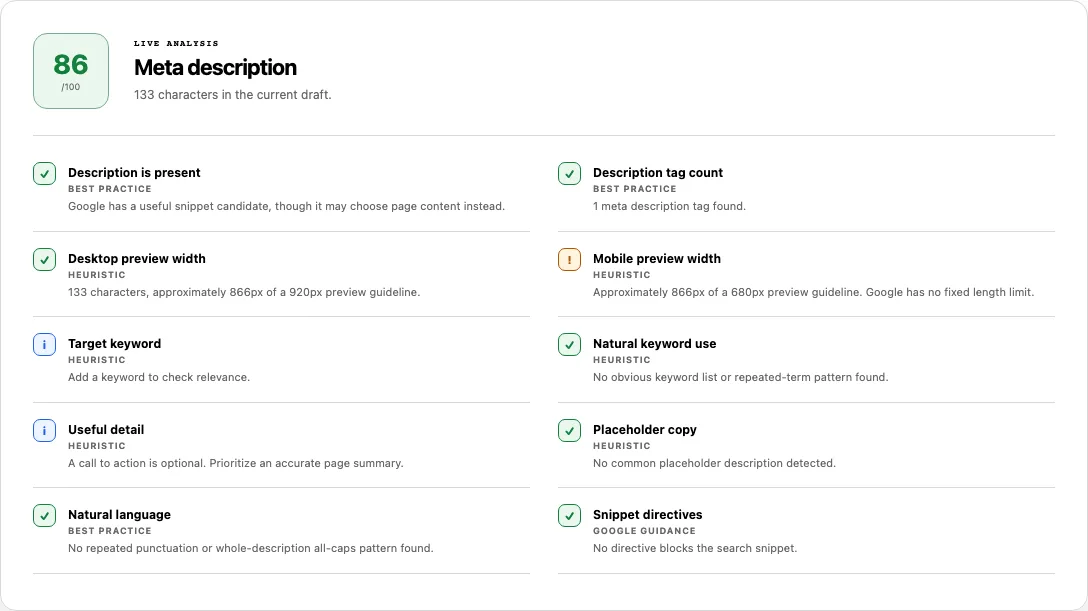
Reading your results: All 10 meta description checks
Meta Description Checker combines DOM tag inspection, HTML5 canvas pixel measurement, editorial quality heuristics, and HTTP/meta robots directive parsing:
| Check title | Basis | How the analyzer evaluates it |
|---|---|---|
Description is present |
Best practice | Passes when a non-empty description string is provided or found in meta[name="description"]; fails when missing or blank. |
Description tag count |
Best practice | Passes when at most 1 meta description tag exists in the HTML; fails if 2 or more duplicate meta[name="description"] tags are found. |
Desktop preview width |
Heuristic | Measures rendered glyph width in 400 14px Arial against a 920px desktop guideline. Warns if width exceeds 920px. |
Mobile preview width |
Heuristic | Measures rendered glyph width against a 680px mobile guideline. Notes explicitly that Google has no fixed length limit. |
Target keyword |
Heuristic | Reports Info if no keyword was entered. When provided, checks word-boundary token matching so substrings do not trigger false passes. |
Natural keyword use |
Heuristic | Flags keyword stuffing if any single meaningful non-stopword repeats 4+ times and accounts for more than 12% of meaningful words. |
Useful detail |
Heuristic | Checks for task-oriented verbs (such as learn, check, compare, get, find, try, explore, download). Passing is optional; missing an action verb reports Info without reducing your score. |
Placeholder copy |
Heuristic | Fails if template boilerplate is detected (such as lorem ipsum, description goes here, welcome to our website, add a description, or untitled). |
Natural language |
Best practice | Warns if the description contains repeated exclamation/question marks (!!) or is written entirely in uppercase letters. |
Snippet directives |
Google guidance | Combines meta[name="robots"], meta[name="googlebot"], and HTTP X-Robots-Tag headers to flag nosnippet, max-snippet:0, max-snippet:N, or malformed max-snippet syntax. |
Capability boundary: The 0–100 score is editorial guidance for your description candidate. It does not predict rankings and cannot guarantee that Google will display your meta description verbatim instead of extracting text from the page body.
Worked example: Pixel width vs. character count and snippet directives
Character counters treat narrow letters (i, l, t) the same as wide uppercase letters (W, M, G). In addition, a valid description tag can still be suppressed by a robots header. Consider this server response:
HTTP/2 200 OK
x-robots-tag: max-snippet:80

<head>
  <meta name="description" content="Check HTTP response headers, HSTS, CSP, cookies, and redirect chains for any public URL." />
  <meta name="description" content="Welcome to our website" />
</head>
When you run Meta Description Checker on this URL, the report catches three issues that a simple character counter misses:
- Duplicate tags (
Description tag count→ Failed): Two<meta name="description">tags exist in the<head>—often caused by an SEO plugin outputting a custom tag while the theme template still prints a default tag. - Desktop vs. Mobile pixel fit: The first description is 88 characters (~540px in
14px Arial), passing both the 920px desktop guideline and the 680px mobile guideline. If the second tag had been read first,Placeholder copywould fail on"welcome to our website". - Header-level snippet cap (
Snippet directives→ Passed with explicit note): Because the HTTP header sentX-Robots-Tag: max-snippet:80, the checker reports: "max-snippet:80 limits the generated snippet; -1 means no explicit maximum." If that header had beennosnippetormax-snippet:0, the row would warn that Google is blocked from showing any text snippet at all.
Why Google rewrites meta descriptions (and how snippet directives work)
According to Google's Control your snippets in search results documentation, Google generates snippets primarily from visible page content and uses the <meta name="description"> tag when it gives users a more accurate description of the page than can be taken directly from the body text.
| Scenario or Directive | Effect on Google Search snippets | When to use or fix |
|---|---|---|
| Query matches a specific subheading on the page | Google often ignores the meta description and extracts the paragraph under the matching <h2> or <h3>. |
Normal search behavior. Write clear Answer-First paragraphs under your headings so extracted snippets read cleanly. |
| Description is boilerplate, stuffed, or duplicated across pages | Google discards the meta tag even for brand or homepage queries. | Write a unique summary for each indexable URL that names the specific tool, topic, or offer on that page. |
nosnippet or max-snippet:0 |
Prohibits Google from showing any text snippet or video preview for the page in search results. | Remove from public pages unless legal or licensing rules forbid search previews. |
max-snippet:-1 |
Explicitly permits Google to choose the snippet length it deems most effective. | Common default in modern CMS SEO configurations (such as index, follow, max-snippet:-1). |
data-nosnippet HTML attribute |
Excludes a specific <span>, <div>, or <p> from being extracted into body-generated snippets. |
Wrap cookie banners, legal disclaimers, or sidebar widgets in <div data-nosnippet> so Google only extracts main content. |
Common problems and fixes
Use these fixes to resolve warnings or failures in your meta description report:
Desktop preview widthpasses (≤920px), butMobile preview widthwarns (>680px).
Cause: Descriptions between ~115 and ~155 characters often fit a two-line desktop snippet (920px) but exceed the 680px mobile heuristic.
Fix: Front-load the core value proposition and primary entity in the first 600–650px (~100–115 characters) so mobile searchers see the complete thought even if the tail is truncated, or preview both layouts visually in SERP Snippet Preview.Description is presentfails in URL mode, even though you see the tag in Chrome DevTools.
Cause: Your single-page application injects<meta name="description">via client-side JavaScript after the initial HTML response.
Fix: Move meta description rendering to the server or static build step, and verify its presence in View Source.Description tag countfails with 2 tags.
Cause: Both a layout partial and a page-level SEO block emitted a<meta name="description">element.
Fix: Search your returned HTML in View Source forname="description"and delete the fallback tag so exactly one remains:<meta name="description" content="Validate XML sitemaps and sitemap indexes against sitemaps.org protocol rules and W3C lastmod dates." />Natural keyword usewarns about repeated terms.
Cause: A single non-stopword appears 4 or more times in the description (for example, "Free SEO checker, SEO audit tool, on-page SEO checker, and technical SEO analyzer").
Fix: Rewrite the list into a natural sentence that explains what the page does without repeating the head noun in every clause.
How this check works
In From URL mode, Meta Description Checker fetches the server-returned HTML, collects all meta[name="description" i] elements, and merges robots directives from meta[name="robots" i], meta[name="googlebot" i], and the HTTP X-Robots-Tag response header. In Paste text mode, it analyzes the text you type in real time inside your browser.
Pixel width is measured on a 2D HTML5 <canvas> using 400 14px Arial against 920px (desktop) and 680px (mobile) guidelines. Word tokenization uses Intl.Segmenter to evaluate keyword presence, stopword-filtered repetition, and placeholder phrases. Snippet directive rules follow Google's robots meta tag and X-Robots-Tag specification.
All URL requests follow the SolViewer public retrieval limits.
Frequently asked questions
Is a meta description a direct Google ranking factor?
No. Google has confirmed that the meta[name="description"] tag is not used as a direct ranking signal in search algorithms. Its purpose is to provide a clear, compelling summary that helps searchers decide whether your page answers their query.
Why does SolViewer measure pixels (920px / 680px) instead of enforcing 160 characters?
Google search result containers are constrained by pixel width on the screen, not character count. A 150-character string with many capital letters and wide characters (W, M) can overflow 920px, while a 170-character string with narrow letters (i, l, t) may fit comfortably.
Why does Useful detail show an Info icon instead of a Warning when I don't use an action verb?
Technical documentation, reference articles, and encyclopedic pages often summarize facts better without a marketing call-to-action verb. Therefore, Useful detail is unscored when informational copy is used and never reduces your guidance score.
What is the difference between meta[name="description"] and og:description?
<meta name="description"> is read by search engines (like Google and Bing) as a candidate for search result snippets. <meta property="og:description"> is an Open Graph tag read by social platforms (Facebook, LinkedIn, Slack, Discord). Use Open Graph Checker to inspect social tags.
How can I stop Google from pulling boilerplate footer text into my search snippet?
Ensure your page has a specific <meta name="description"> that accurately reflects the page topic, and add the data-nosnippet attribute to non-editorial DOM containers (such as cookie banners, navigation menus, or legal footers) in your HTML.
Related tools
- SERP Snippet Preview — see a live visual mock of how your title tag and meta description truncate at 580px/920px (desktop) and 560px/680px (mobile).
- SEO Checker — audit your meta description alongside title tags, canonicals, headings, and structured data.
- Open Graph Checker — check how your
og:descriptionandtwitter:descriptionrender on social networks. - View Source — verify the exact
<meta name="description">tags present in the server-returned HTML.
Public URL requests follow the shared fetch limits on the About page.