How to run an on-page SEO check
To audit a webpage's technical and on-page SEO signals, enter its public URL and review the categorized evidence report.
- Enter the full public webpage address (including
https://) into the Webpage URL input. - Select Check Page to fetch the initial HTML response, origin discovery files, and bounded network verification probes.
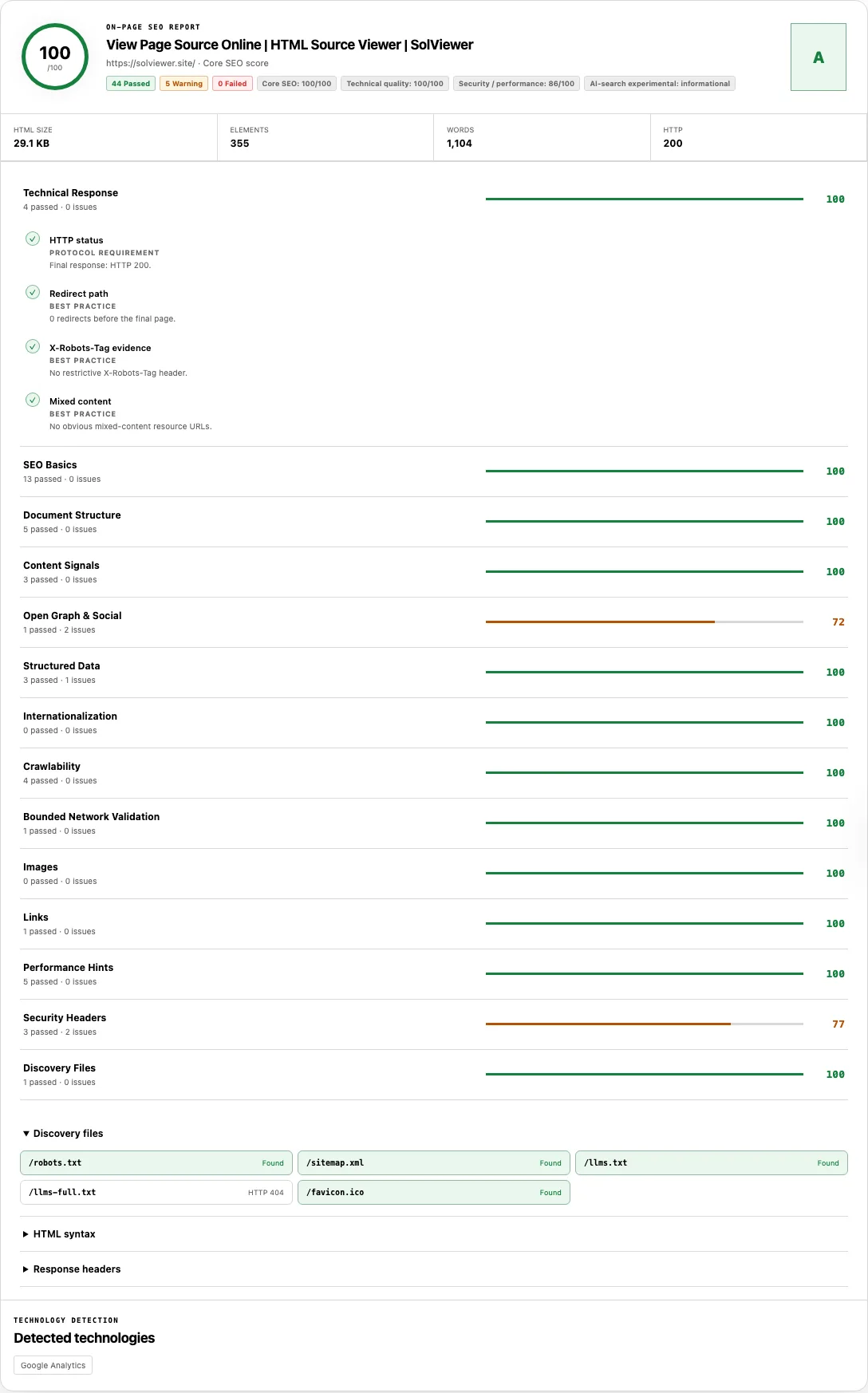
- Review the top summary bar: check the Core SEO score ring (0–100 and letter grade A–F), the status counters (
Passed,Warning,Failed), and the separate scope pills (Technical quality,Security / performance, andAI-search experimental). - Expand each of the 14 audit categories to inspect individual findings, read the basis badge on every check, and open the bottom evidence drawers (
Discovery files,HTML syntax,Response headers, andDetected technologies).
Reading your results
Most SEO audit tools blend critical indexing blockers with minor stylistic suggestions into a single opaque number. SolViewer isolates its scoring into four distinct score groups and labels the evidentiary basis of every single check.
| Score group | What it measures | Checks included in this group |
|---|---|---|
| Core SEO (Primary 0–100 score & Grade) | Signals that directly govern whether search engines can fetch, index, consolidate, and interpret the page's primary metadata and structured data. | HTTP status, Redirect path, Title tag, Title tag count, Meta description, Description tag count, Canonical URL, Canonical tag count, Canonical target, HTML lang attribute, Single H1, JSON-LD parses, Validated schema fields, Hreflang values and URLs, Self-referencing hreflang, Unique hreflang codes, Index directives, Googlebot page access, Canonical response, Hreflang return links, and Image alt coverage. |
| Technical quality | DOM hygiene, mobile viewport setup, character encoding, semantic landmarks, and link usability. | Mixed content, Mobile viewport, Charset declaration, HTML5 doctype, Heading hierarchy, Empty headings, Duplicate IDs, Deprecated tags, Main content landmark, Image dimensions, Usable link targets, and Internal discovery. |
| Security / performance | Transport security headers and server/markup delivery hints that support site reliability. | HTTPS, HSTS, Content-Security-Policy, X-Content-Type-Options, Referrer-Policy, Fetch response time, HTML transfer size, Render-blocking scripts in head, Inline <style> blocks, and Offscreen image hints. |
| AI-search experimental | Emerging machine-readability conventions that are informational and never penalize your SEO score. | llms.txt discovery check (unweighted Info status). |
Inside the 14 expandable categories—Technical Response, SEO Basics, Document Structure, Content Signals, Open Graph & Social, Structured Data, Internationalization, Crawlability, Bounded Network Validation, Images, Links, Performance Hints, Security Headers, and Discovery Files—every row carries one of four statuses: Passed (✓), Warning (!), Failed (×), or Info (i, unscored observation).
Capability boundary: This report inspects the initial HTML returned by the server for a single URL plus bounded probes. It does not execute client-side JavaScript, crawl your entire domain, measure field Core Web Vitals (CrUX), or guarantee search rankings or Google indexation.
How to read the five basis labels
Every check displays a basis badge next to its title so you know whether a warning violates a technical specification or merely crosses an editorial guideline:
| Basis label | Definition | Examples in the report |
|---|---|---|
| Protocol requirement | A strict rule defined by HTTP, HTML, XML, JSON, BCP 47, or RFC 9309 specifications. Failing a protocol check means the syntax or response is objectively broken or restrictive. | Non-2xx HTTP status, Index directives (noindex/none), Googlebot page access blocked by robots.txt, malformed JSON-LD parses, or invalid Hreflang values and URLs. |
| Google guidance | Documented recommendations from Google Search Central for consolidating duplicates, qualifying for rich results, or declaring localized alternates. | Title tag presence, Canonical URL validity and live 2xx Canonical response, Self-referencing hreflang, reciprocal Hreflang return links, and Validated schema fields (for FAQPage, HowTo, BreadcrumbList, Product, and LocalBusiness). |
| Heuristic | A practical numeric band chosen to flag unusually short, long, or heavy values. Crossing a heuristic band is a cue to review, not an SEO error. | Title display length (30–60 chars), Description display length (70–160 chars), Readable text (200+ words pass, 80–199 warn), Title and H1 topic term overlap, Fetch response time (≤1000 ms), and HTML transfer size (≤200 KiB). |
| Best practice | Standard web engineering, accessibility, social-sharing, or security hygiene that improves user experience and link previews without acting as a direct Google ranking factor. | Heading hierarchy (no skipped levels), Unique element IDs, Open Graph basics, HSTS (max-age >= 31536000), Content-Security-Policy, and X-Content-Type-Options: nosniff. |
| Experimental | Optional emerging conventions tracked for informational awareness only. | llms.txt presence at the origin root. |
Worked example: Auditing canonical, hreflang, and indexability conflicts
Consider an e-commerce product page at https://example.com/uk/shoes that is accidentally dropping out of search results. Running SEO Checker on that URL reveals how server HTML, HTTP headers, and bounded network probes interact:
HTTP/2 200 OK
content-type: text/html; charset=utf-8
x-robots-tag: all

<head>
  <title>Running Shoes — Lightweight Road Trainers | Example UK</title>
  <link rel="canonical" href="https://example.com/us/shoes" />
  <link rel="alternate" hreflang="en-gb" href="https://example.com/uk/shoes" />
  <link rel="alternate" hreflang="en-us" href="https://example.com/us/shoes" />
</head>
Here is how SEO Checker diagnoses the configuration across three categories:
- SEO Basics →
Canonical target(Warning · Google guidance): WhileCanonical URLpasses becausehttps://example.com/us/shoesis a valid HTTPS address,Canonical targetwarns: "Canonical points elsewhere: https://example.com/us/shoes". Because the UK page canonicalizes to the US URL, search engines are instructed to fold the UK page into the US listing. - Internationalization & Bounded Network Validation →
Hreflang return links(Failed · Google guidance): The checker fetches up to 8 declaredhreflangalternates to verify reciprocity. Ifhttps://example.com/us/shoesdoes not include a return<link rel="alternate" hreflang="en-gb" href="https://example.com/uk/shoes">tag,Hreflang return linksfails, explaining why regional swapping is broken. - Structured Data →
Validated schema fields(Warning · Google guidance): If the page includes aProductJSON-LD block with anamebut omitsoffers,review, andaggregateRating,JSON-LD parsespasses (valid JSON syntax), whileValidated schema fieldswarns: "Missing or invalid fields: Product.offers, review, or aggregateRating."
Common problems and fixes
Use these targeted fixes when resolving failed or warning rows in your audit:
Index directivesfails even though no<meta name="robots">tag is in the HTML.
Cause: The server sent an HTTP response header such asX-Robots-Tag: noindexorX-Robots-Tag: none, which SEO Checker merges with HTML meta robots directives.
Fix: Expand the Response headers drawer at the bottom of the report (or run HTTP Header Checker) to locate the header, then remove thenoindexheader from your CDN, reverse proxy, or staging environment configuration. See Google's robots meta tag and X-Robots-Tag specification.Canonical targetwarns orCanonical responsefails.
Cause: The<link rel="canonical">points to a different URL, or the bounded probe to that canonical URL received a 4xx/5xx error.
Fix: Ensure indexable pages use a self-referencing canonical URL that returnsHTTP 200. Never point a canonical tag at a 404 page or a redirect chain:<link rel="canonical" href="https://example.com/current-preferred-path/" />Hreflang return linksfails on localized pages.
Cause: Page A declares Page B as an alternate language version, but when SolViewer probes Page B (sampling up to 8 alternates), Page B either returns a non-2xx status or lacks a matchinghreflangtag pointing back to Page A.
Fix: Give every localized version a complete, reciprocal set ofhreflanglinks—including a self-referencing link and anx-defaultfallback—as documented in Google's localized versions guide.HowTo search displaywarns even thoughJSON-LD parsespasses.
Cause: YourHowToJSON-LD object has valid Schema.org properties, but Google retiredHowTorich results in search.
Fix: No urgent removal is required; the warning has a weight of0and does not lower your Core SEO score. Keep the markup if other consumers use it, or focus your rich-result testing on active types likeFAQPage(where eligible),Product,LocalBusiness, andBreadcrumbList.Title display lengthorDescription display lengthshows a Warning.
Cause: The title falls outside the 30–60 character band, or the meta description falls outside the 70–160 character band.
Fix: Treat both bands as heuristics. If your 64-character title or 165-character description fits within the pixel limits in SERP Snippet Preview and reads clearly, you do not need to force it into a character count.Readable textfails on a page that looks full of content in your browser.
Cause: The page renders its article body on the client via JavaScript after load, leaving fewer than 80 words in the server HTML afterscript,style,nav, andfooternodes are stripped.
Fix: Inspect the raw markup in View Source and move primary body copy to server-side or static HTML rendering.
How this check works
When you submit a URL, SolViewer fetches the HTML response and simultaneously runs bounded origin probes for discovery files (/robots.txt, /sitemap.xml, /llms.txt, /humans.txt, /ads.txt, /.well-known/security.txt, and /favicon.ico) along with bounded verification requests for the declared canonical URL, up to 8 hreflang alternate URLs, and the og:image resource.
In the browser, seo-analyzer.js parses the HTML with DOMParser, strips boilerplate landmarks (nav, footer, form, dialog, script, style) to count readable words, resolves @id references inside JSON-LD @graph blocks, and evaluates Googlebot access against the retrieved robots.txt using RFC 9309 longest-match rules. Canonical, robots, and snippet checks align with Google Search Central documentation on consolidating duplicate URLs, title links, and snippets.
All network requests follow the SolViewer public retrieval limits.
Frequently asked questions
Does a 100/100 Core SEO score guarantee my page will rank or be indexed?
No. A 100/100 Core SEO score means the server-returned HTML and bounded network probes passed our technical and on-page checks without errors or warnings. Search rankings and indexation depend on search intent, content originality, site authority, internal linking, and Google's own indexing pipeline.
Do missing security headers like HSTS or CSP lower my Core SEO score?
No. Security headers (HTTPS, HSTS, Content-Security-Policy, X-Content-Type-Options, and Referrer-Policy) and performance hints are isolated in the Security / performance score group. They never reduce your primary Core SEO score.
How does the SEO Checker validate JSON-LD structured data?
First, it checks that every <script type="application/ld+json"> block parses as valid JSON. Next, it resolves @graph and @id references and validates required properties for FAQPage (non-empty mainEntity with Question name and Answer text), HowTo (name and valid steps), BreadcrumbList (at least two ListItem entries with position, name, and item), Product (name plus offers, review, or aggregateRating), and LocalBusiness (name and address).
Why does the checker only test up to 8 hreflang return links?
To keep live audits fast and avoid flooding origin servers with dozens of simultaneous requests, Bounded Network Validation probes a sample of up to 8 declared hreflang URLs. If your page declares more than 8 language alternates, verify the remaining URLs individually.
Does this tool execute JavaScript before auditing the page?
No. SEO Checker audits the initial HTML document returned by the web server. If your site relies on client-side JavaScript to inject titles, canonical tags, or schema, those elements will be missing from this report—which also warns you that non-rendering crawlers cannot see them.
Related tools
- View Source — inspect the exact line-numbered HTML document that this SEO report analyzed.
- Robots.txt Checker — test path-level Allow and Disallow rules across 8 crawler user-agents and inspect sitemaps declared in
/robots.txt. - HTTP Header Checker — run a dedicated audit of redirect chains, cookie flags, Cross-Origin Isolation headers, and raw HTTP response fields.
- Open Graph Checker — preview how your server-rendered social tags render on Google, X, Facebook, LinkedIn, Slack, and Discord.
Public URL requests follow the shared fetch limits on the About page.